High-precision time measurement function similar to clock_gettime(CLOCK_MONOTONIC) on Windows
Write on April 11, 2024 Thanks for the comments. When I wrote How to measure the running time of a function or function in C/C++ (serial and parallel, and the actual comparison of three methods), I only experimented with Unix-like systems such as Linux and Mac, and did not consider Windows.
This article only considers the time measurement function of the first party (Microsoft). Some third-party libraries for high-precision time measurement are not discussed here.
The best method for high-precision time interval measurement in Windows is QPC (QueryPerformanceCounter).
QPC does not rely on an external time reference. It is a differential clock, not the absolute time we usually say (such as “2020/3/18 14:29:59”, sometimes also vividly called wall time) similar to clock(). And QPC is not affected by standard time or system time, similar to CLOCK_MONOTONIC in clock_gettime().
QPC uses hardware counters to calculate time. Generally on x86 architecture devices, QPC measures time by accessing the processor’s TSC (time stamp counter), but the BIOS of some devices may not set the CPU characteristics correctly, such as setting it to variable TSC, which will be affected by other factors. Or devices with multiple processors, because there are two TSC sources, and they may not be the same. If this happens, Windows will use the platform counter or other timers on the motherboard instead of TSC. In this case, the cost will be 0.8 to 1.0 microseconds higher. Although it is mainly implemented using TSC, Microsoft officially does not recommend using RDTSC/RDTSCP (the latter has one more specified CPU) to directly obtain TSC information, because this will greatly reduce the compatibility of software programs (for example, if the program runs on a device system with variable TSC or no TSC, the code may not run or the error may be large). Generally, C/C++ compilers have built-in functions
__builtin_ia32_rdtsc()or__builtin_ia32_rdtscp(), so you can directly use the codeuint64_t rdtsc = rdtsc();to get the counter count, and then do the difference, similar to the use ofclock(), but you also need to calculate the TSC frequency to get the accurate time. **TSC is just one of them. Windows 8 and later versions of Windows will use multiple hardware counters to detect errors and try to compensate. **
However, the accuracy of QPC is two orders of magnitude lower than that of the clock_gettime() method, which can only reach 100 nanoseconds, and cannot achieve the 1 nanosecond accuracy of clock_gettime(), but it is sufficient for most cases.
Here is an example of QPC (the first line is to show which library needs to be imported):
#include <windows.h>

int main()
{
LARGE_INTEGER StartingTime, EndingTime, ElapsedMicroseconds;
LARGE_INTEGER Frequency;

QueryPerformanceFrequency(&Frequency);
QueryPerformanceCounter(&StartingTime);

...code to be measured

QueryPerformanceCounter(&EndingTime);
printf(" %.1f us", 1000000*((double)EndingTime.QuadPart - StartingTime.QuadPart)/ Frequency.QuadPart);
}
LARGE_INTEGER is a union on Windows, and its contents are as follows:
typedef union _LARGE_INTEGER {
struct {
DWORD LowPart;
LONG HighPart;
} DUMMYSTRUCTNAME;
struct {
DWORD LowPart;
LONG HighPart;
} u;
LONGLONG QuadPart;
} LARGE_INTEGER;
It is a data type used to store 64-bit integers on Windows. If the compiler has built-in support for 64-bit integers, use the QuadPart member to store 64-bit integers. Otherwise, use the LowPart and HighPart members to store 64-bit integers. You can see that in the above example, the QuadPart member variable is used to read a 64-bit integer.
If you are not familiar with union, please read my other blog: C——What is Union? Union and Struct are so similar, what is the difference? Why create union? Where do you need to use it?
QueryPerformanceFrequency is used to obtain the counter frequency. As mentioned earlier, QPC is implemented through hardware counters such as TSC, so it is necessary to know the frequency of the crystal oscillator and calculate the time through count/frequency.
QueryPerformanceCounter is used to obtain the current count value.
printf(" %.1f us", 1000000*((double)EndingTime.QuadPart - StartingTime.QuadPart)/ Frequency.QuadPart); is used to print the calculated time. ((double)EndingTime.QuadPart - StartingTime.QuadPart)/ Frequency.QuadPart is the formula of count/frequency. The previous 1000000 is used to convert units, indicating microseconds. If you want to calculate milliseconds, it is 1000, and nanoseconds is 1000000000.
It is important to use different %.xf for different units. The precision mentioned above is only 100 nanoseconds. If you use 1000000000, with nanoseconds as the unit, you will find that the rightmost two digits of the integer are always 0, as follows:
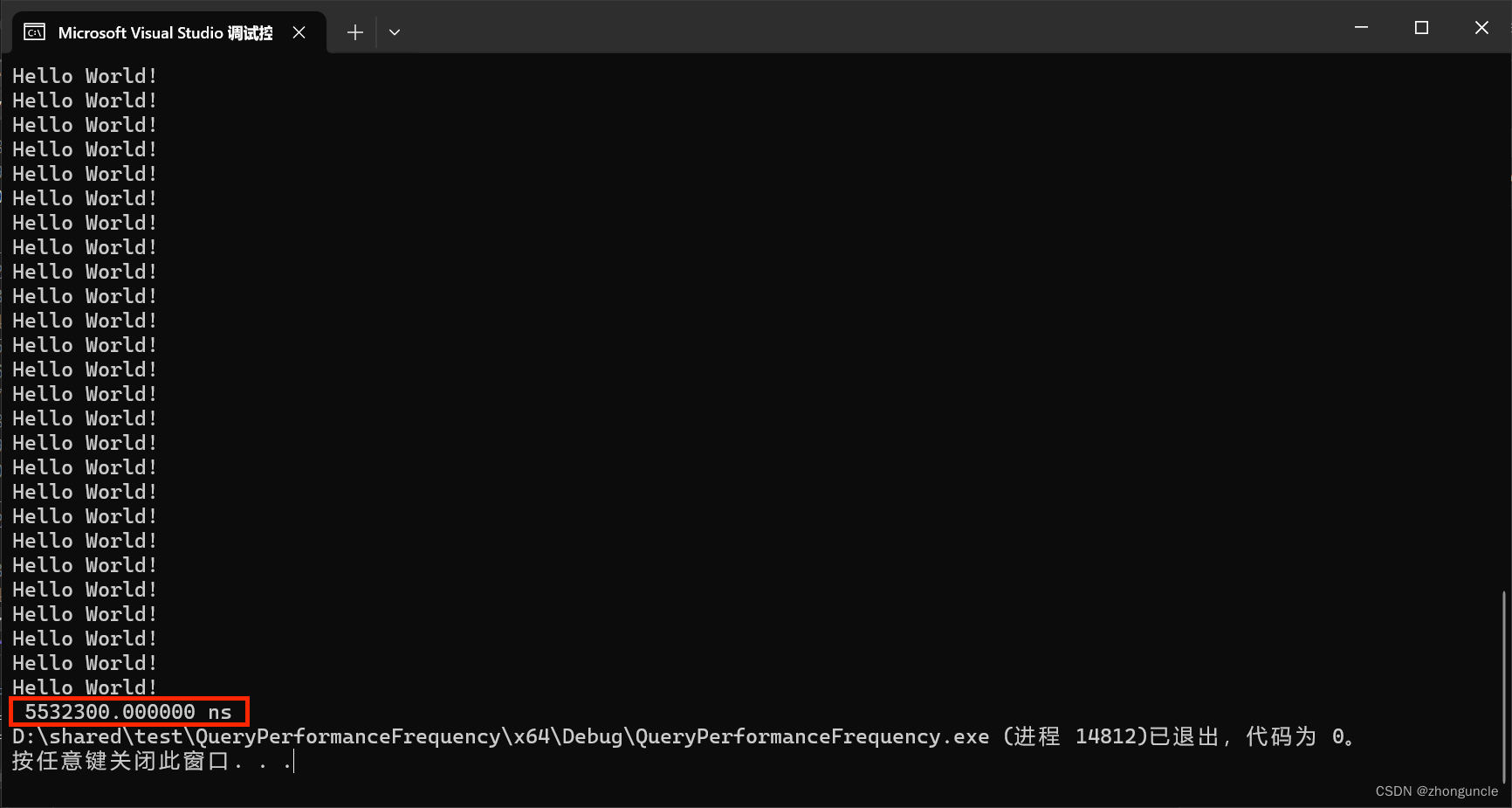
So when printing microseconds, use %.1f, and when printing nanoseconds, use %.f or %.0f. Any more digits will exceed the precision range (of course, there may be alignment needs, so it depends on yourself, this is just a suggestion).
I hope this helps those in need~
References/Extended Reading
Acquiring high-resolution time stamps - Microsoft Learn: This is an official Microsoft article about acquiring high-precision time. If you want to learn about the underlying and other knowledge about how Windows acquires time, you can take a look. I think the most worthwhile part is the part about errors Resolution, Precision, Accuracy, and Stability, which introduces some reasons for errors when acquiring time through hardware counters. It is a good extension.
Time - Microsoft Learn: A column introducing various times on Windows.
LARGE_INTEGER union (winnt.h) - Microsoft Learn: Introduction to LARGE_INTEGER.