Compile & Use ISPC on Ubuntu: Fix Single-Core Issue with LLVM/Clang
I’ve been using ISPC on macOS for a while, but it’s limited by the small number of cores/threads. Recently, I wanted to switch to Ubuntu, but the snap-installed ISPC only ran on a single core for some reason. To fix this, I decided to compile ISPC from source—this requires Clang and LLVM. However, Ubuntu has a quirk: many software versions are tied to the system version, and the default installed LLVM/Clang is version 14, which may lack necessary components. I had no choice but to tackle this, and took the opportunity to study their compilation and usage.
This post is a quick memo, not a detailed guide.
Prerequisites
First, install required build tools:
sudo apt-get install git curl cmake xz-utils m4 flex bison python3 libtbb-dev g++-multilib
Compile LLVM (with Clang & LLD)
While the official docs mention APT installation, the version is incompatible. Compiling LLVM takes a long time—if you have few CPU cores, you can use the official script to install prebuilt binaries and rename them manually (also cumbersome).
Fortunately, most modern processors (with big.LITTLE cores) have a dozen or more threads, making compilation manageable. I once compiled it on a 6-core CPU overnight—it was painfully slow.
LLVM compilation is time-consuming with complex options. We only need LLVM, Clang, and LLD for ISPC. Use this command:
cmake -S llvm -B build -G 'Unix Makefiles' -DLLVM_ENABLE_PROJECTS="clang;lld" -DCMAKE_BUILD_TYPE=Release
Build with all available threads:
make -j$(nproc)
Install (move binaries to system directories):
cmake --build . --target install
Note: The FileCheck tool may not be copied automatically (not sure if it’s a command oversight or my environment). Manually copy it if missing:
sudo cp FileCheck /usr/local/bin/FileCheck
Verify LLVM installation (check version and path):
$ which llvm-config
/usr/local/bin/llvm-config
$ llvm-config --version
21.0.0git
You can also verify Clang with clang --version.
For more compilation details, check out my other blog post (link omitted as per original).
Compile ISPC
First, clone the ISPC repository:
git clone https://github.com/ispc/ispc.git
Not recommended to use the official installation script—it’s too slow due to network issues.
Compile ISPC (do NOT run in the ISPC repo directory; use a separate build-ispc folder):
cmake -B build-ispc ispc
Build with all threads (avoid the official cmake --build build-ispc—it only uses one core):
cd build-ispc
make -j$(nproc)
Add the ISPC binary directory to your PATH (replace <your-directory> with the actual path):
export PATH="$PATH:<your-directory>/build-ispc/bin"
If you’re unfamiliar with modifying
PATH, refer to my CSDN post: How to Directly Use Scripts or Downloaded Programs in macOS Terminal - ZhongUncle
Verify ISPC installation:
$ ispc --version
Intel(r) Implicit SPMD Program Compiler (Intel(r) ISPC), 1.27.0dev (build commit f988909621671856 @ 20250313, LLVM 21.0.0)
Use ISPC
Important: Add the --pic (Position-Independent Code) option when compiling ISPC kernels—this fixes linking errors:
ispc SGEMM_kernels.ispc -O3 -o SGEMM_kernels_ispc.o -h SGEMM_kernels_ispc.h --target=avx2-i32x16 --pic
The
--picoption is quite obscure—I found it by digging through the documentation!
Then compile the host code with a general-purpose compiler like clang++ or g++:
clang++ -O3 SGEMM_main.cpp SGEMM_kernels_ispc.o ../common/tasksys.cpp
Fix Linking Error
Without --pic, you may encounter this error:
/usr/bin/ld: SGEMM_kernels_ispc.o: relocation R_X86_64_32 against `.text' can not be used when making a PIE object; recompile with -fPIE
/usr/bin/ld: failed to set dynamic section sizes: bad value
collect2: error: ld returned 1 exit status
Run the Compiled Program
After successful compilation, run the executable (example matrix multiplication test):
$ ./a.out 2048 16 4096

Usage: SGEMM (optional)[ispc iterations] (optional)[[Matrix A Rows] [Matrix A Columns/ matrix B Rows] [Matrix B Columns]]
./a.out
ispc iterations = 500[default],	 Matrix A Rows = 2048,	 Matrix A Columns/ matrix B Rows = 16, Matrix B Columns = 4096
                   SGEMM_naive_withTasks     5.4232 millisecs    49.4920 GFLOPs Validation: valid.
             SGEMM_tileShuffle_withTasks     2.7940 millisecs    96.0635 GFLOPs Validation: valid.
        SGEMM_tileNoSIMDIntrin_withTasks     1.4964 millisecs   179.3685 GFLOPs Validation: valid.
   SGEMM_tileBlockNoSIMDIntrin_withTasks     1.0402 millisecs   258.0334 GFLOPs Validation: valid.
 SGEMM_tileBlockNoSIMDIntrin_2_withTasks     1.0505 millisecs   255.5048 GFLOPs Validation: valid.
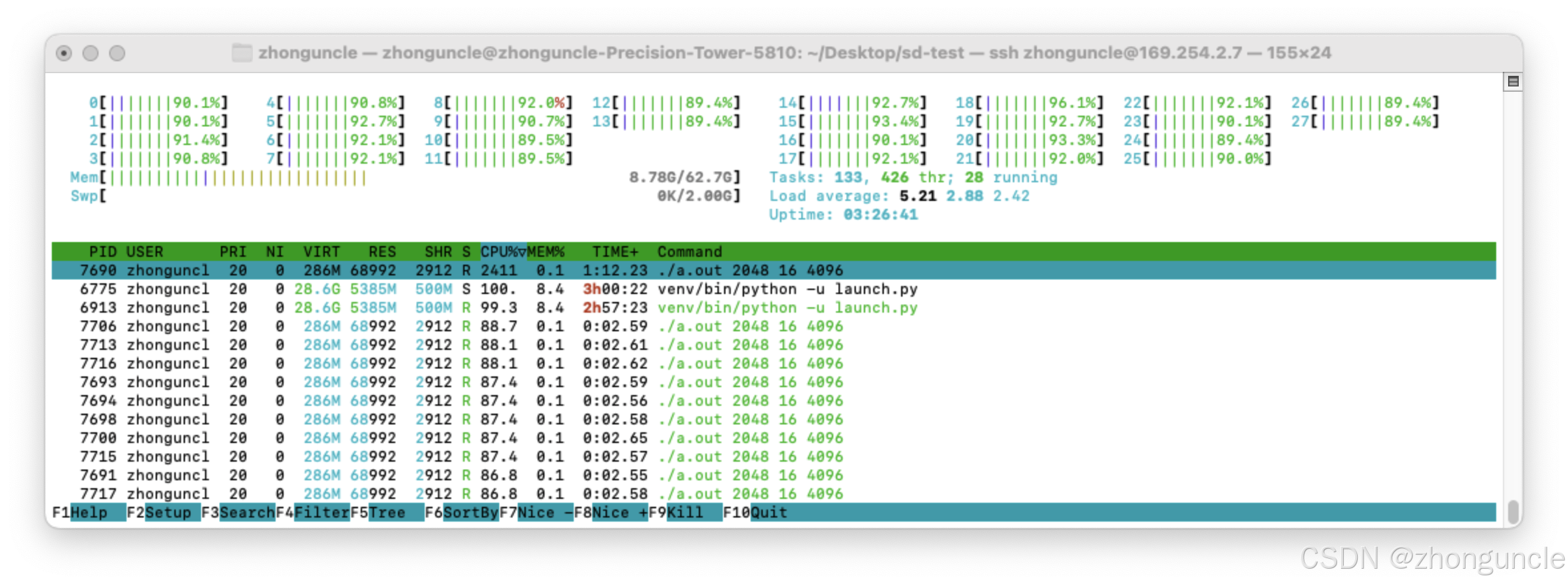
The CPU should run at full utilization (look for the ./a.out 2048 16 4096 process):
Side Note
ISPC was the first parallel computing language I learned, and I invested a lot of time studying it.
Despite the sentimental value, I don’t recommend ISPC. The main reason: Intel updates ISPC too frequently with major changes, and the documentation is incomplete. This wastes a lot of time on research and updates instead of actual coding—it’s just too cumbersome.
I hope these will help someone in need~